
Explicit content settings
Spotify includes explicit content because we offer it how the artist intends it to be heard.
For under 19s
To meet local legal requirements, we restrict certain explicit content if you’re under 19.
For over 19s
If you’re over 19, you can confirm your age to listen to any restricted content.
You’ll get a notification when you try to play a 19+ song. Just tap CONTINUE and follow the instructions.
Recognizing explicit content
Look out for the 19 icon on any releases.
Note: We tag explicit content depending on information we receive from rights-holders.
Report explicit content
To report a song, podcast, or audiobook that isn’t tagged correctly, contact us.
Filter explicit content
Pick your device to allow or block anything with explicit tags.
When explicit content is switched off, anything with an explicit tag is grayed out. You can’t play it, and it’s automatically skipped.
Note: If you’re using Spotify Connect to control another device, changes to explicit content settings apply when you play something next.
- Tap your profile picture at the top.
- Tap Settings and privacy
 .
. - Under Content and display, switch Allow Explicit Content on
 or off
  .
.
- Click your profile picture at the top, and select Settings.
- Under Explicit Content, switch Allow playback of explicit-rated content on or off .
Finding clean versions
You can check for clean versions of anything with an explicit tag.
Note: Some explicit releases may not have a clean version.
Search a song title to find any versions without explicit tags.
- On an album page, scroll down to the bottom of the track listing.
- Find more releases of the same album at the bottom.
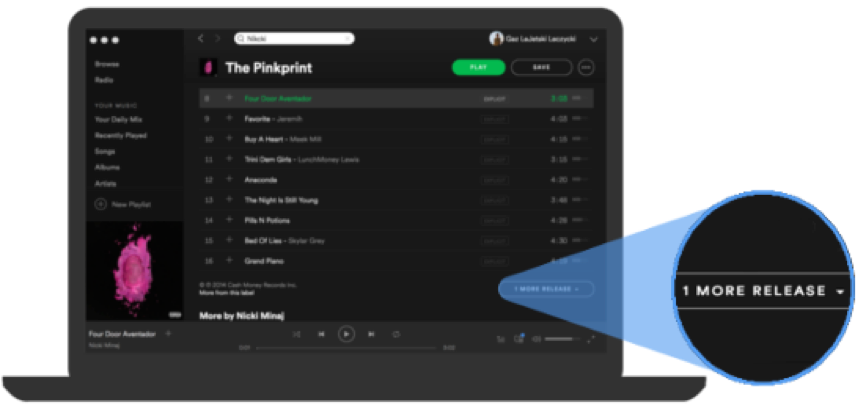
Note: If you don’t see this option, there are no other versions of the album on Spotify.
You can also search a song title to find any versions without explicit tags.

Related Articles
- Changing how you log into Spotify
- Can’t log in to Spotify
- Spotify login methods
- How to reset or change your Spotify password
- Logging in to Spotify with Facebook
- Logging in to Spotify with Apple
- Logging in to Spotify with Google
- Logging in to Spotify with Samsung
- Logging in to Spotify with Naver
- Can’t play abroad
- Spotify disabled accounts
- How to log out of Spotify